Can You Schedule Substack Notes? Yes — But Here's Why Writers Use SubflowAI
Quick Answer: Yes — Substack added basic one-at-a-time Notes scheduling in March 2026. But for batch scheduling (30+ Notes in one click), AI repurposing in your Brand Voice, a visual calendar, and analytics, writers use SubflowAI. Most creators batch 30 days of content in one 5-minute session by repurposing their existing Substack articles or newsletter posts.
Watch: Schedule 30 Days of Substack Notes in 5 Minutes
The Problem: Why Substack Writers Struggle with Notes
If you're reading this, you've probably experienced it: You start your Substack journey with grand plans. Three Notes a day. Consistent posting. Watch that subscriber count climb.
Day 1? You post five Notes. Feeling unstoppable.
Day 4? You missed one. It's fine.
Day 10? What Notes?
You're not alone. In my experience working with dozens of Substack writers, the pattern is painfully consistent:
- 85% of writers who commit to daily Notes quit within two weeks
- The average creator posts 2.3 Notes in their first week, then drops to 0.4 per week by month two
- Writers who maintain consistent Notes posting see 3-5x faster subscriber growth than those who don't
The problem isn't motivation. It's constant remembering, context switching, and friction.
The Friction Points
1. One-at-a-Time Scheduling Substack now lets you schedule Notes — but only one at a time. Want to schedule 30 Notes for the month? That's 30 separate scheduling sessions. Open the app, write the note, pick a time, confirm. Repeat 29 more times. Miss your batch window because of a meeting? The rest of your Notes don't get scheduled.
2. The "I'll Do It Later" Trap Without scheduling, "later" becomes "never." Your brilliant idea at 6 AM gets forgotten by noon.
3. Inconsistent Quality Under Pressure When you're scrambling to post something—anything—quality suffers. You know those Notes you've posted that felt forced? The ones that got crickets? That's pressure posting.
4. Time Zone Chaos If you're targeting a US audience but live in Europe (or vice versa), optimal posting times mean setting alarms for 3 AM. Unsustainable.
5. The Content Drought Cycle You have great weeks where ideas flow. Then dry spells. Without a content buffer, one bad week tanks your momentum.
What This Actually Costs You
Let's do quick math:
- Average Substack Notes reach: 500-2,000 impressions
- Conversion rate to subscribers: 0.5-2%
- Missing 5 Notes per week = 2,500-10,000 lost impressions
- That's 12-200 potential subscribers lost per week
Over a year? 624-10,400 subscribers you didn't gain. For many writers, that's the difference between a hobby and a business.
The Manual Method (And Why It Fails)
Some writers try the manual approach:
- Set phone reminders
- Pre-write notes in Apple Notes or Google Docs
- Copy-paste-cut at posting time
It works for about a week, some last even a month. Then:
- You silence the alarm during a meeting
- You can't find the right note in your messy doc
- The copy-paste formatting gets mangled
- The can't acces phone while driving
- You just... stop
What writers actually need:
- Write notes when inspiration hits
- Repurpose already created content in the form of articles/newsletters
- Schedule them for optimal times
- Batch a week's content in one focused session
- Never think about posting again until next batch day
That's exactly what I built SubflowAI for myself. It solved all these problems for me as I went through them.
Solutions Landscape: What Are Your Options?
Before diving into SubflowAI, let's be fair and look at what exists. What are your actual options for scheduling Substack Notes?
Comparison Table: Substack Notes Scheduling Options
| Solution | Scheduling | AI Help | Calendar View | Price | Best For |
|---|---|---|---|---|---|
| Manual (reminders) | No (fake scheduling) | No | No | Free | Person who has all the time |
| Buffer/Hootsuite | No Substack integration | No | Yes | $5-15/mo | Other platforms |
| Notion + Zapier / n8n | Complex | Yes | Yes | $10+/mo | Engineers who like to build |
| Substack Native | Yes (one at a time) | No | No | Free | 1-2 Notes per week |
| SubflowAI | Yes (batch + server-side) | Yes (AI + Brand Voice) | Yes | $9.97/mo | Writers who schedule at scale |
Why Generic Schedulers Don't Work
Tools like Buffer, Later, and Hootsuite are great for Twitter, Instagram, and LinkedIn. But they don't support Substack Notes because:
- No API access - Substack doesn't offer a public API for Notes
- Authentication complexity - Substack uses session-based auth that generic tools can't handle
- Formatting loss - Copy-pasting destroys Substack's rich text formatting
The "Zapier/n8n Hack - which I tried for a month"
Some technically-minded folks including myself have tried building n8n automation workflows. The reality:
- Takes 6-8 hours to design and set up the entire system including visual calendar
- Breaks when Substack updates anything (happened all the time to me)
- No preview before posting
- No image support
- No link cards support
- Costs time to maintain and self-host n8n workflows
What SubflowAI Does Differently
SubflowAI is a Chrome extension purpose-built for Substack Notes. It:
- Server-side scheduling - Notes sync directly with Substack's server-side publishing queue. They publish even when Chrome is closed
- Batch scheduling at scale - Schedule 30+ Notes in one click, across multiple days with smart distribution
- Preserves formatting - Rich text (bold, italic, lists) posts exactly as designed
- Adds AI superpowers - Turn any article into 7 Note variations with one click
- Brand Voice - Configure your identity, tone, and signature phrases so AI Notes sound like you
- @Mentions & Link Previews - Tag other Substack writers and get rich link preview cards
- Visualizes your content - Full calendar view of scheduled and published Notes
- Smart distribution strategies - Quickly distribute & schedule content over next few days with weekday selection
- Bulk Import - Import multiple Notes via JSON and batch-schedule them all at once
- Support inline images & link cards - Full support for uploading inline images or links to your articles
- Remix top notes - One-click AI variations from your best-performing content
- Auto-sync - Reconciles local state with Substack's servers every 15 minutes
- Queue management - Automatically manages Substack's server-side publishing queue
It's not trying to be everything for everyone. It's specifically the best tool for Substack writers who want consistent Notes without the daily grind.
→ Try SubflowAI free for 5 days — no credit card needed
Substack Native Scheduling vs SubflowAI: What's Different?
In March 2026, Substack added the ability to schedule individual Notes. This is a welcome addition — and SubflowAI integrates seamlessly with Substack's server-side scheduling. Here's how they compare:
What Native Scheduling Gives You
- Schedule one Note at a time
- Pick a date and time
- Note publishes on Substack's servers (no browser required)
What's Still Missing from Native
- No batch scheduling (30+ Notes at once)
- No AI content repurposing
- No Brand Voice configuration
- No visual calendar for monthly planning
- No smart time slots or weekday selection
- No analytics or top-performer tracking
- No remix from best-performing content
- No bulk import (JSON)
Side-by-Side Comparison
| Capability | Substack Native | SubflowAI |
|---|---|---|
| Schedule a single Note | Yes | Yes |
| Schedule 30+ Notes at once | No | Yes (one click) |
| Server-side publishing | Yes | Yes |
| AI content generation | No | 7 variations per article |
| Brand Voice | No | Full configuration |
| Visual calendar | No | Monthly grid view |
| Smart time slots | No | 5 configurable slots |
| Weekday selection | No | Skip weekends/specific days |
| Batch import (JSON) | No | Yes |
| Analytics & patterns | No | Engagement tracking |
| Remix top notes | No | AI-powered variations |
| Queue management | Manual | Automatic |
| Auto-sync | N/A | Every 15 minutes |
When to Use Native vs SubflowAI
Use Substack native if: You post 1-2 Notes per week and are happy scheduling them individually.
Use SubflowAI if: You want to batch a week or month of Notes in one session, repurpose articles into Notes with AI, or see your content strategy on a calendar. The time savings start at 3+ Notes per week — and grow exponentially from there.
Visual Calendar: Plan Your Entire Month
When I surveyed 50+ Substack writers about what they wanted most in a Notes tool, "see the big picture" came up constantly. Writers don't just want to schedule posts, they want to see their content strategy.
The Calendar View
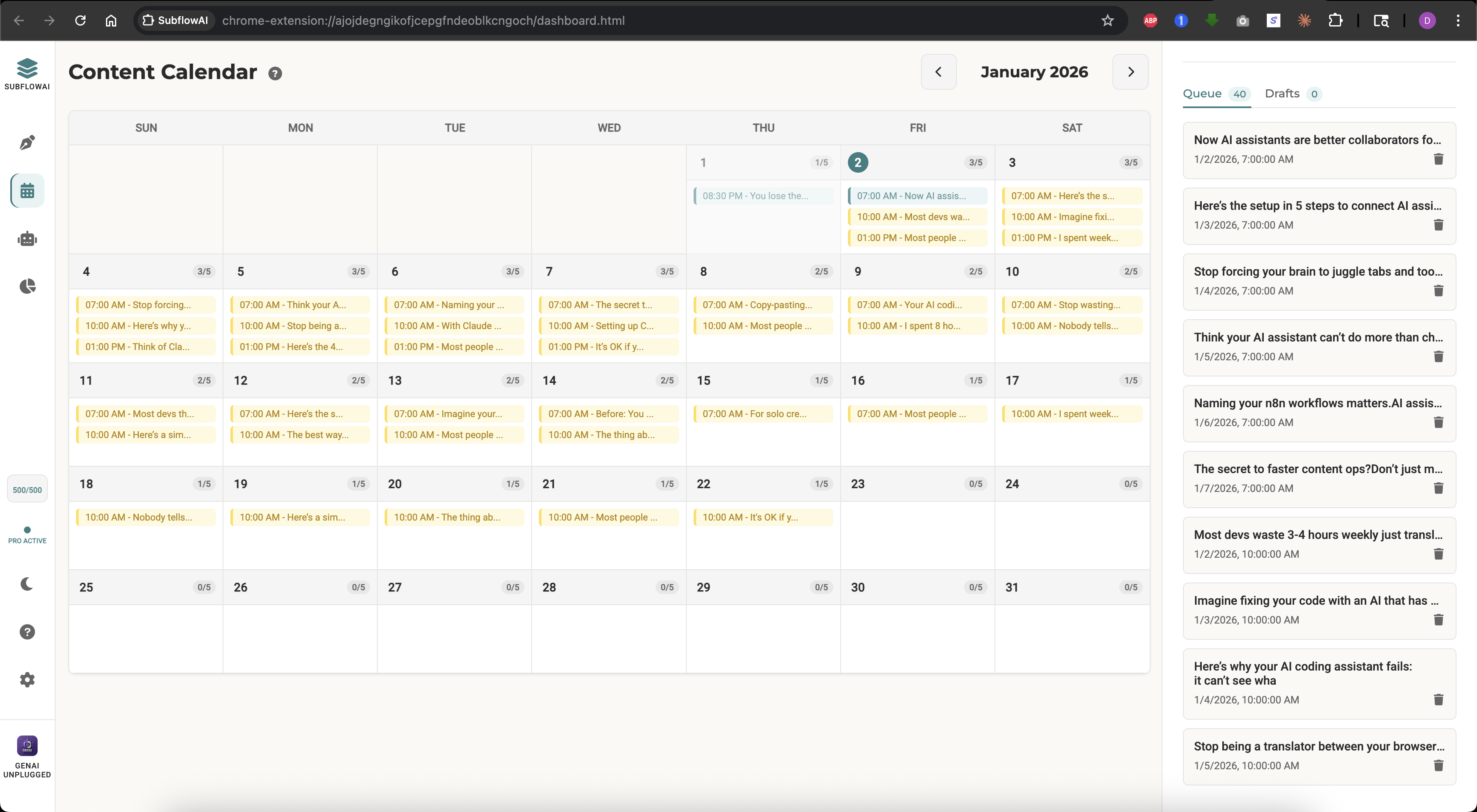
SubflowAI's calendar is a full monthly grid showing:
- Scheduled Notes - Future posts queued and waiting
- Published Notes - Past posts with status (delivered/failed)
- Capacity Indicators - Headers turn teal when 5+ notes are scheduled for a day
- Empty Days - Gaps in your posting schedule jump out visually
How Writers Actually Use It
The "Content Audit"
Open the calendar and immediately see:
- Are there posting gaps this week?
- Am I front-loading Monday and ignoring Friday?
- Do I have backup content if next week gets busy?
The "Batch Planning Session"
Most power users do this:
- Open calendar on Sunday evening
- See the next 2 weeks
- Identify 10 empty slots
- Batch-write notes to fill them
- Close SubflowAI until next Sunday
Time spent: 10-15 minutes Notes scheduled: 10-15 Mental load for the next two weeks: Zero
Click-to-Edit
See a note scheduled for Tuesday that needs tweaking? Click it directly in the calendar:
- Edit the content inline
- Change the scheduled time
- Delete if it no longer fits
No hunting through lists. No confusion about what's where.
Quick Add
Hover over any future date and see a + button. Click it to:
- Create a new note
- Pre-filled with that date's first available time slot
- Add to your schedule in seconds
This is how you fill gaps without breaking flow.
Capacity Management
The teal header warning is subtle but powerful. When a day reaches 5+ scheduled notes, the visual cue tells you:
"Maybe spread these out?"
There's no hard-coded limit—some writers post 10+ Notes daily. But the visual hint helps prevent accidentally front-loading your week and leaving Friday empty.
Synced with Drafts & Delivered
The calendar connects to your:
- Drafts tab - Notes saved but not scheduled
- Queue tab - Scheduled notes awaiting publish
- Analytics tab - Delivered notes with history
One click switches views. The calendar is the hub, not an island.
AI Repurposing: Turn 1 Article into 7 Notes
Here's the secret weapon: You don't have to write Notes from scratch. With an AI-powered content system, you can repurpose everything you already create.
Every week, you probably consume or create long-form content:
- Your own Substack articles
- Interesting articles you read
- Podcast notes
- Book highlights
- Twitter threads
All of that is raw material for Notes.
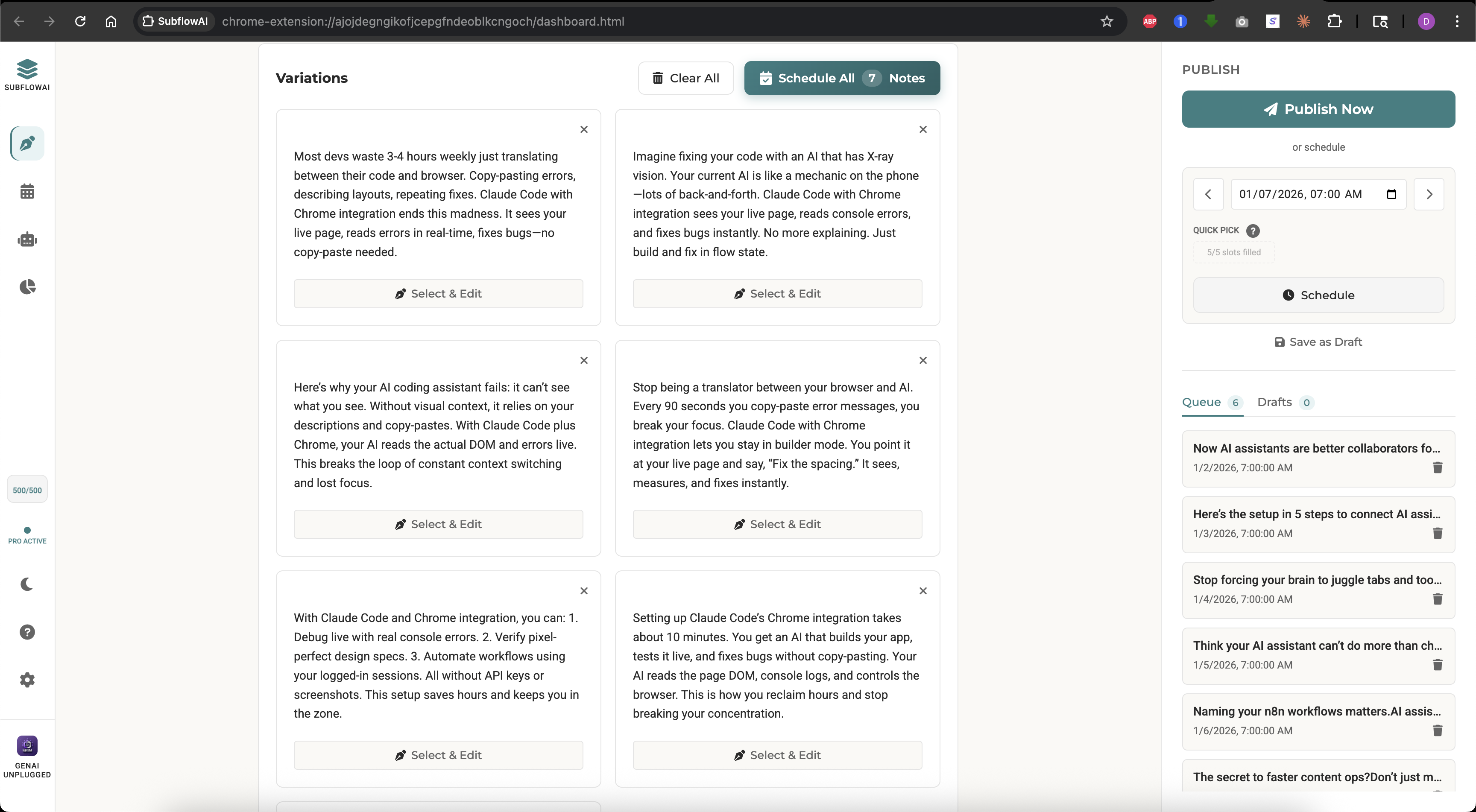
SubflowAI's AI Studio takes any content and transforms it into 7 unique, ready-to-post Note variations — all written in your configured Brand Voice.
How It Works (Step-by-Step)
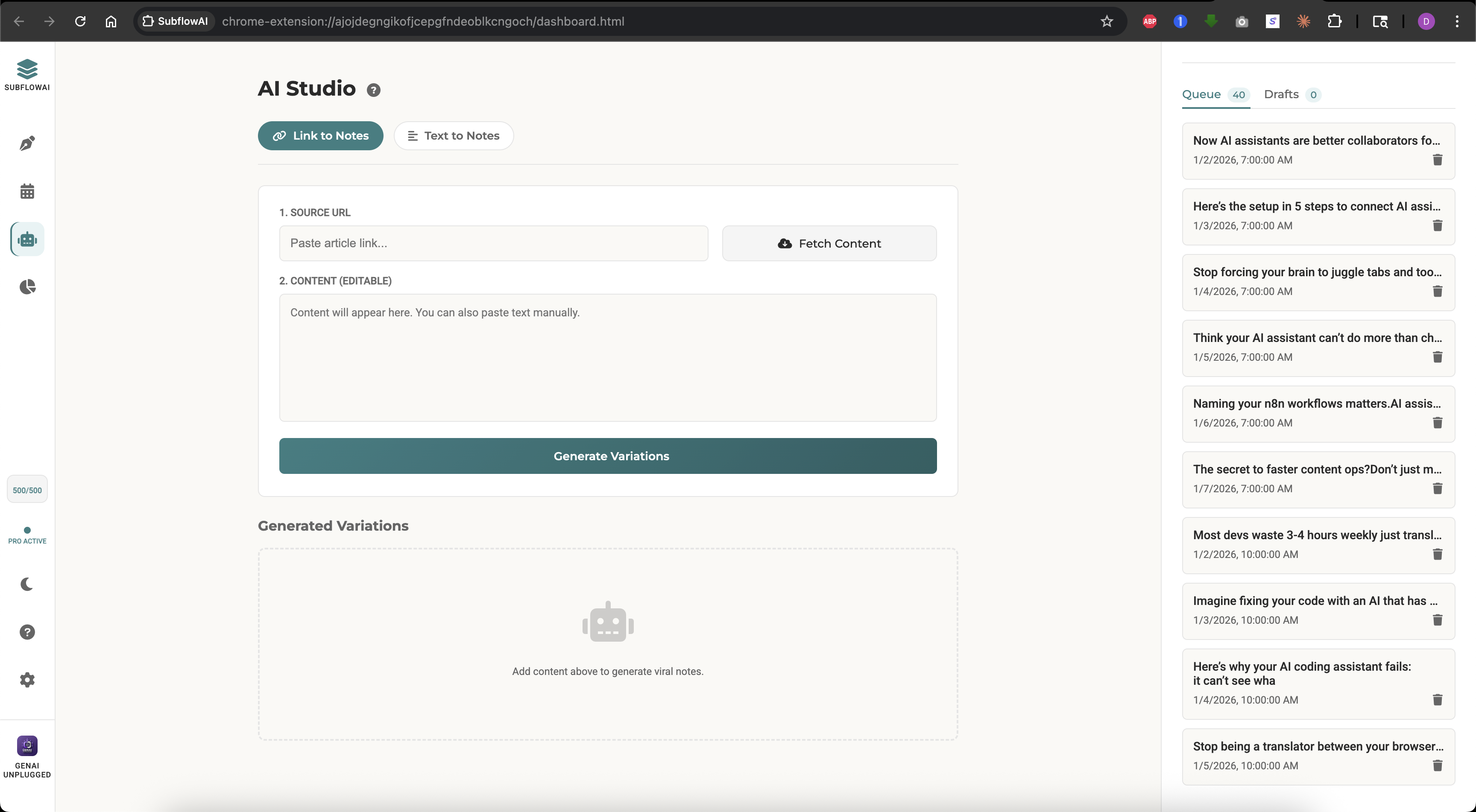
- Paste a URL - Drop in any public article link
- OR Paste raw text - Copy-paste from anywhere
- Click "Generate Variations"
- Review 7 AI-written Notes - Each takes a different angle, all in your Brand Voice
- Edit as needed - Fine-tune any variation
- Schedule all 7 - One-click batch scheduling
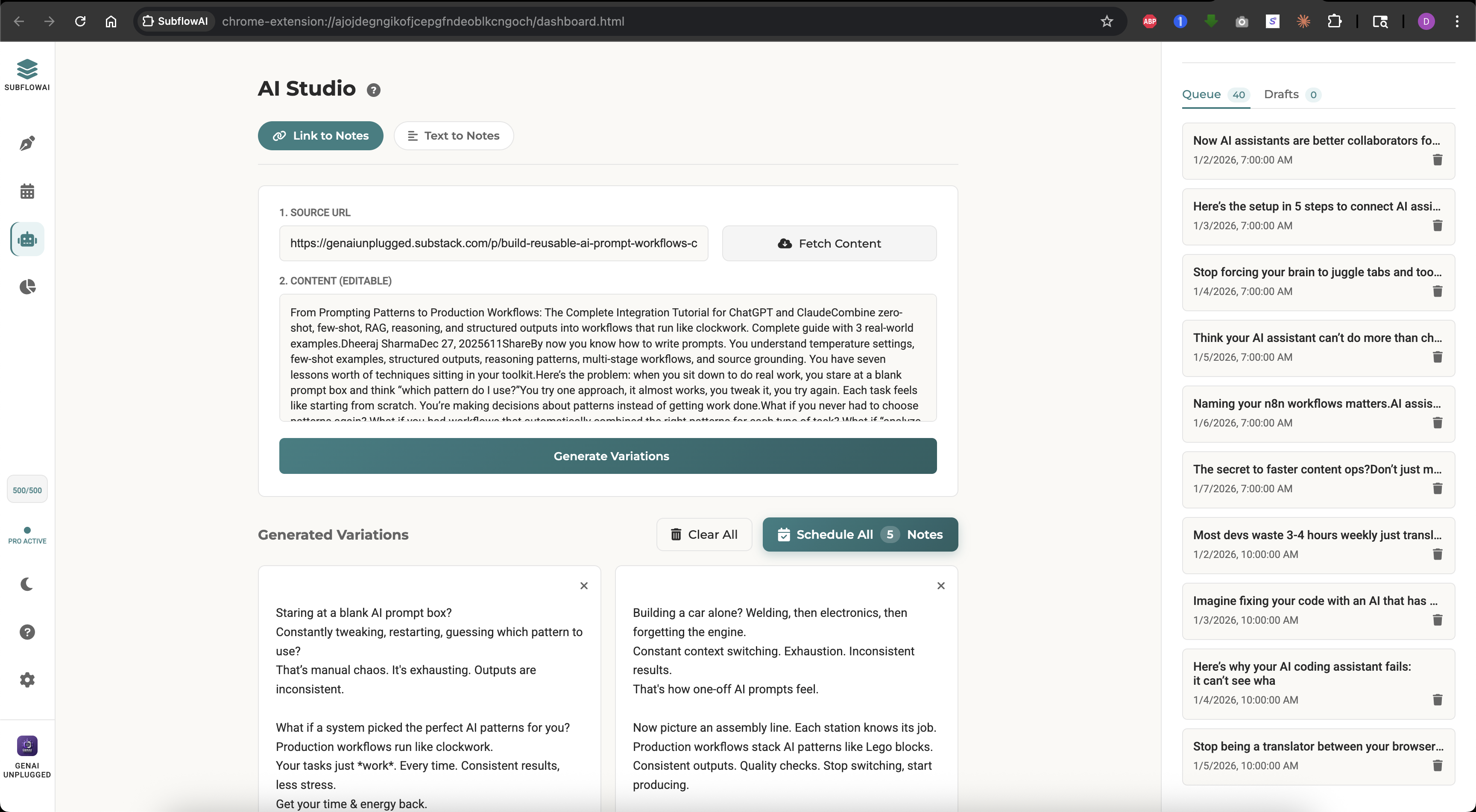
Total time: Under 5 minutes for 7 high-quality Notes. Repeat for a few articles and in under 5 minutes you will have 30 days of Notes scheduled.
The AI System Behind It
SubflowAI uses Google's Gemini with custom prompts optimized for:
- Your Brand Voice - Configure your identity, tone, content frameworks, and signature phrases
- Character limits - Notes sweet spot is 280-375 characters
- Hook patterns - Open with curiosity, close with insight
- No fluff - "Unlock," "Leverage," "Game-changer" are banned
Brand Voice: Your Notes, Your Style
SubflowAI's Brand Voice feature lets you configure exactly how the AI writes for you. Set your:
- Identity - Who you are and what you're known for
- Tone - Your natural writing style (conversational, authoritative, witty, etc.)
- Content Frameworks - The structures you prefer (stories, contrarian takes, data-driven, etc.)
- Signature Phrases - Expressions and vocabulary unique to you
Every AI-generated Note reflects these settings. No more generic AI output that sounds like everyone else.
The system prompt — built with careful prompt engineering — is tuned for what I call "The Chaos → Clarity Pivot":
- The Hook - A specific instance of a problem
- The Pivot - The moment a solution worked
- The Hope - The result (time saved, revenue gained, stress reduced)
This structure resonates because it's relatable, specific, and actionable.
Example: Real AI Output
Input: A 2,000-word article about email marketing automation
AI-Generated Notes (7 variations — showing 3):
Note 1: I used to send newsletters manually. Open Gmail. Copy-paste. Hit send. Repeat 200 times.
Then I set up one automation. Now it happens while I sleep.
The tool wasn't fancy. The system was.
Note 2: "I don't have time for email marketing."
Translation: "I'm still doing it manually."
Automated: 1 hour setup, then 0 hours/week. Manual: 0 hours setup, then 3 hours/week.
Math is math.
Note 3: The best email I ever sent took 2 minutes to write.
...3 months after I wrote it.
Scheduled drip sequences are time machines. Past you does the work. Future you gets the results.
Each note hits differently. Some work better for certain audiences. You pick your favorites, tweak them, and schedule.
AI Refine Tools
Not happy with a specific note? Use the inline refine buttons:
- Fix Grammar - Clean up typos and awkward phrasing
- Make Punchy - Tighten the language
- Shorten - Cut 30% while keeping the core
- Expand - Add nuance for longer-form notes
This is AI as a collaborator, not a replacement. You stay in control.
Content Sources That Work Best
| Source | Works Well? | Tips |
|---|---|---|
| Your own Substack articles | Excellent | Repurpose your archive |
| YouTube video transcripts | Excellent | Repurpose your videos |
| Blog posts you read | Great | Add your take |
| Twitter threads | Good | Expand the ideas |
| Podcast transcripts | Great | Pull key quotes |
| YouTube video descriptions | Okay | Needs more editing |
| Feed/homepage URLs | Blocked | Too thin for quality notes |
Smart Scheduling: The Best Times to Post Notes
Not all posting times are equal. SubflowAI's fixed time slots aren't arbitrary—they're based on Substack engagement data and creator best practices.
The 5 Fixed Time Slots
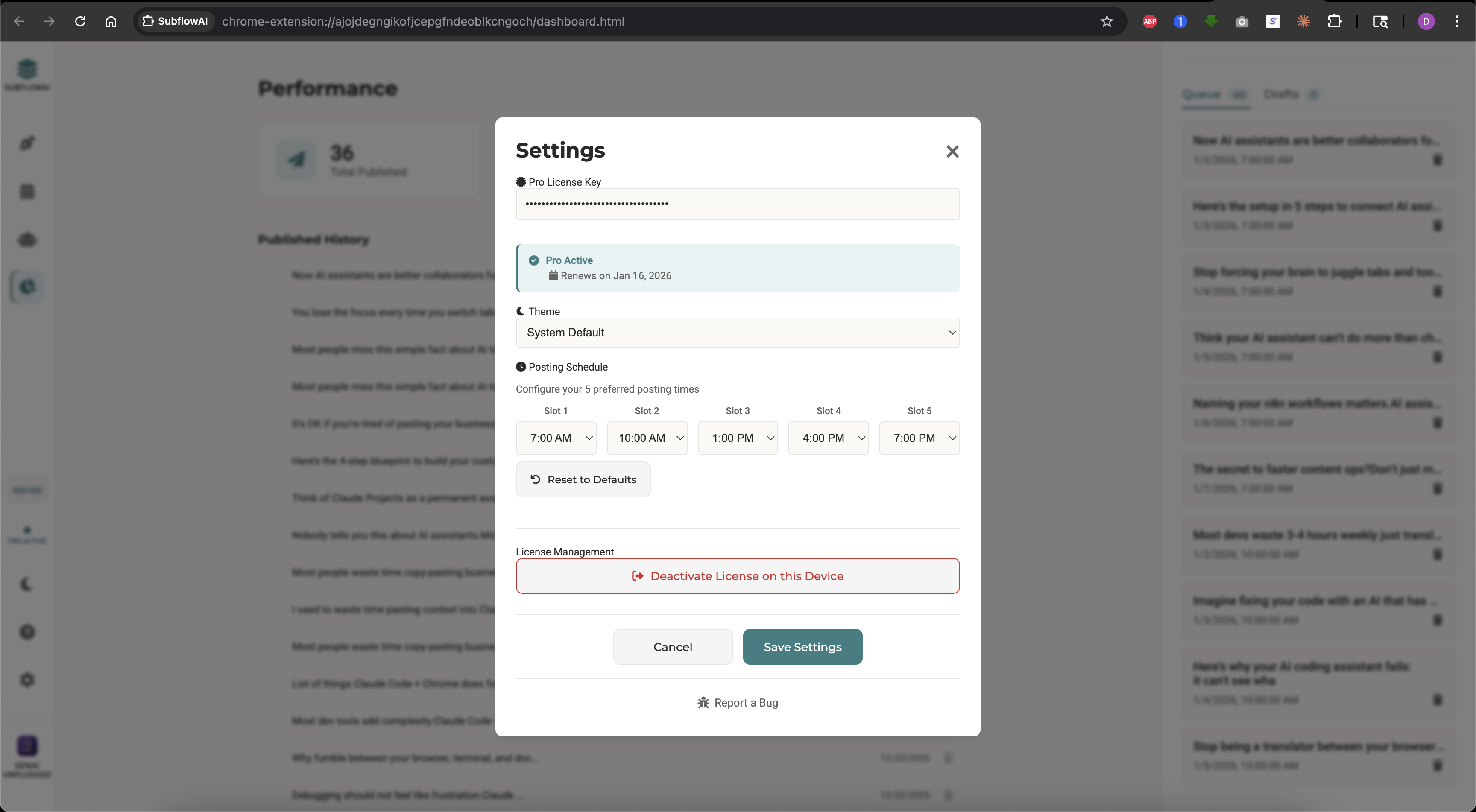
| Slot | Time | Best For |
|---|---|---|
| Morning Early | 7:00 AM | Catching commuters, early risers |
| Morning Peak | 10:00 AM | Office workers checking feeds |
| Afternoon | 1:00 PM | Post-lunch scroll |
| Evening Early | 4:00 PM | End-of-workday break |
| Evening Prime | 7:00 PM | After-dinner engagement |
These times are in your local timezone, automatically detected.
Why These Specific Times?
7 AM: The Early Bird Advantage
Many readers check Substack first thing. Your Note appears fresh at the top of their feed. Early risers have higher engagement rates—they're not yet overwhelmed by content.
10 AM: Peak Professional Attention
Workers settled into their day take "productive procrastination" breaks. A quick Note scroll feels like a reward. This slot gets highest clickthrough rates.
1 PM: The Lunch Scroll
Post-meal content consumption is universal. Your Note catches readers in relaxed mode. Great for longer-form Notes.
4 PM: The Afternoon Reset
Energy dips in late afternoon. Readers seek stimulation. Your Note provides a mental break before the final work push.
7 PM: Prime Time Personal
Work is done. Readers are in "me time" mode. This slot sees highest bookmark and save rates—readers intend to engage deeply.
Quick Pick Chips
When scheduling a note, SubflowAI shows the next 3 available slots as quick-pick chips:
[Today 4pm] [Today 7pm] [Tomorrow 7am]
One click schedules to that exact time. No date-picker fumbling.
Can I pick Custom Times?
Yes, it let you pick any minute. 3:47 PM? Sure!
But, in practice, this causes:
- Decision paralysis - "Is 3:47 or 4:45 better?"
- Inconsistent testing - Can't compare performance across random times
- Overthinking - Writers spend more time picking times than writing
Fixed slots remove the decision. Pick a slot. Move on. Write more notes.
If you need a very specific time (launching something at exactly 2:00 PM), you can still manually publish at that moment. But for 95% of use cases, the 5 slots cover optimal posting.
Time Zone Intelligence
SubflowAI auto-detects your timezone. All times shown match your location.
If you're targeting a specific audience timezone (e.g., US East Coast but you live in London), adjust your mental mapping:
- Your 12 PM = Their 7 AM (Morning Early)
- Your 3 PM = Their 10 AM (Morning Peak)
Batch scheduling: 30 Days in 5 Minutes OR 7 Days in 30 Minutes
These are the workflows that changes everything. One suites speed while other provide more control. You batch create and schedule once per week with your fine tuned voice added or once per month repurposing existing content.
The 5-Minute Batch Workflow
Minute 0-1: Setup
- Open SubflowAI
- Open your content sources (articles, notes, ideas)
- Open the AI Studio
Minute 2-5: AI Generation Rounds
- Paste your own article text or links → Click Fetch Content
- Click Generate variations → Generate 7 notes
- Click Schedule All → Select 'Smart- across days' Distribution Strategy
- Repeat these steps for 5 more articles
- Verify them in the Calendar view
Result: 30 notes scheduled in under 5 minutes. Zero posting stress for next 30 days.
The 30-Minute Batch Workflow
Minute 0-1: Setup
- Open SubflowAI
- Open your content sources (articles, notes, ideas)
- Open the Calendar view
Minute 5-15: AI Generation Round 1
- Paste your own article from last week → Generate 7 notes
- Pick best 3, schedule for Mon/Tue/Wed
Minute 15-20: AI Generation Round 2
- Paste an interesting article you read → Generate 7 notes
- Add your perspective to 2 of them
- Schedule for Thu/Fri
Minute 20-30: Original Notes
- Write 2-3 original notes from scratch
- These are your "voice" posts—personal insights, questions, opinions
- Schedule as buffers or weekend posts
Result: 8-10 notes scheduled. Zero posting stress for 7 days.
The Batch Scheduling Feature
After you've written or generated notes, you don't have to schedule them one by one.
Batch Schedule mode:
- Write multiple notes (or select from AI variations)
- Click "Schedule All"
- SubflowAI auto-assigns optimal times across your selected days
- Review the calendar
- Confirm
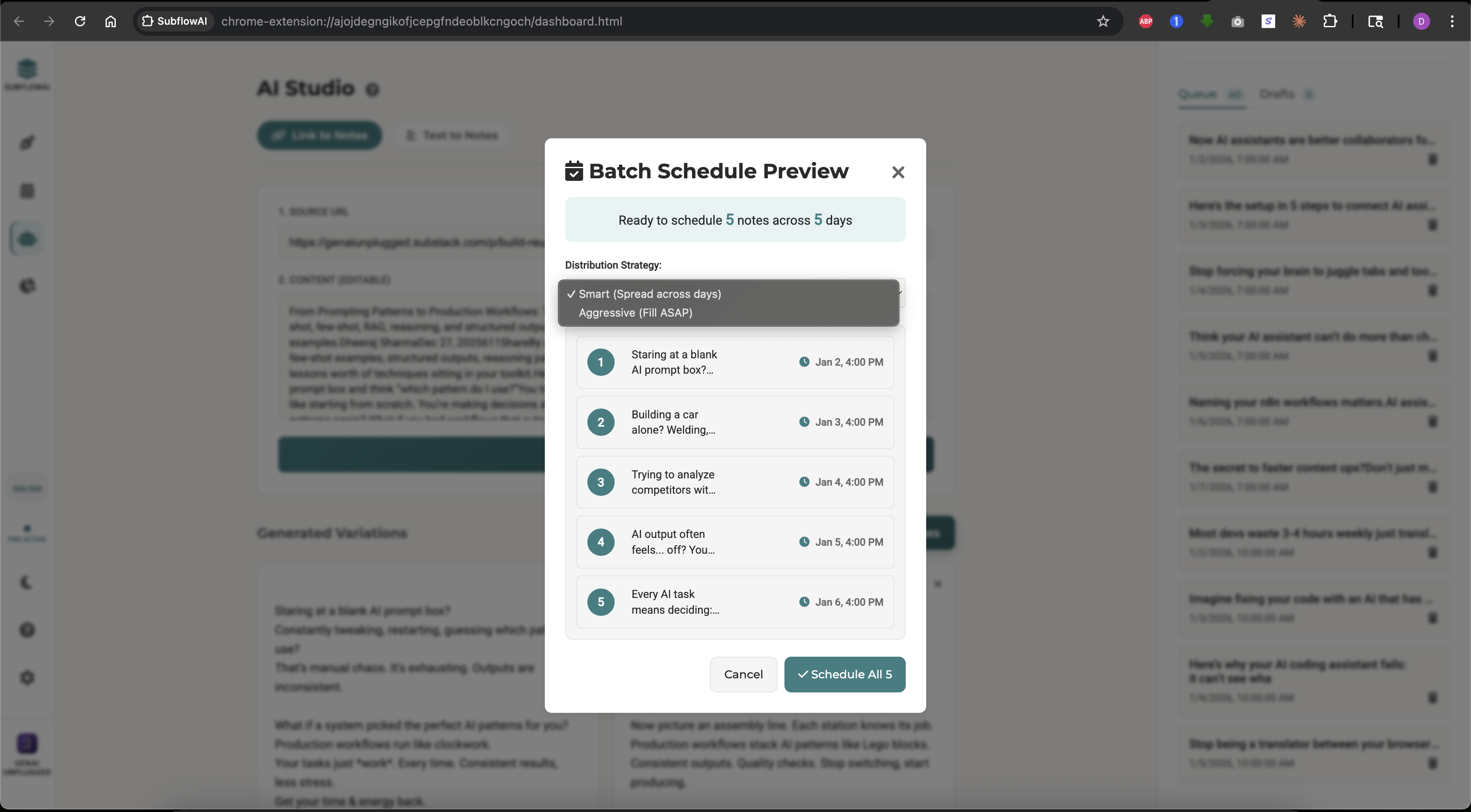
The algorithm:
- Avoids double-posting within 2 hours
- Spreads notes across the day
- Prefers morning and evening prime slots
- Respects your existing scheduled notes
Real Creator Results
"SubflowAI genuinely feels like the missing piece in my Substack workflow. Being able to plan and schedule Notes weeks ahead has taken away the daily pressure to post on time. The AI repurposing is surprisingly useful and helps turn one good idea into multiple engaging Notes without feeling repetitive. The editor is simple, focused, and actually enjoyable to use. This is clearly built by someone who understands how Substack writers think and work." — Ashutosh Tripathi, Chrome Web Store Review (5 Stars)
"This extension is incredible! It makes my life as a Substack creator much easier. I don't need to post notes manually, and the ability to generate notes from existing content is an added bonus. I just click a few buttons and the extension does it for me. It also schedules each note in a smart way to fill your week. I'm amazed by this, and I know there's nothing else like it out there." — Elena Calvillo, Chrome Web Store Review (5 Stars)
"Amazing product here by Dheeraj Sharma! I had the opportunity to test it for him and can vouch for how well-built it is. It truly is a game-changer where Substack notes are concerned!" — Patrick Schaber, Approachable AI (Substack)
"I love Dheeraj Sharma's new Substack Notes scheduler. It's incredibly easy to use. I haven't saved much time scheduling notes until I tried his tool. The price is insanely attractive. I highly recommend it!" — Elena, AI Product Leader (Substack)
"I'm so glad I found this app! I've only been using it for a couple of weeks but I love being able to batch and schedule my Substack notes. And they're adding functionality all the time! I tried to use the app as much as I could during the free trial and I paid for a subscription as soon as my free trial ended." — Stephanie Thurrott, Chrome Web Store Review (5 Stars)
"So nice to have these type of tools to synthesize meaning from posts you already poured hours into writing! This looks like a nice, clean interface." — Natalie Nicholson (Substack)
Ready to join them? Start batch scheduling your Substack Notes today.
Start Your Free TrialThe Psychology of Batching
Why daily posting is harder than batching:
- Context switching - Each posting moment requires finding content, writing, scheduling
- Decision fatigue - "What should I post today?" is exhausting
- Motivation dependency - Bad days = no posts
Why batching works:
- Deep work - One focused session beats 7 scattered micro-sessions
- Bulk creativity - Ideas flow when you're in writing mode
- Peace of mind - Week's content is done, brain is free
Rich Text Editor: Format Notes Without Hassle
Plain text is fine for simple notes. But sometimes you need structure.
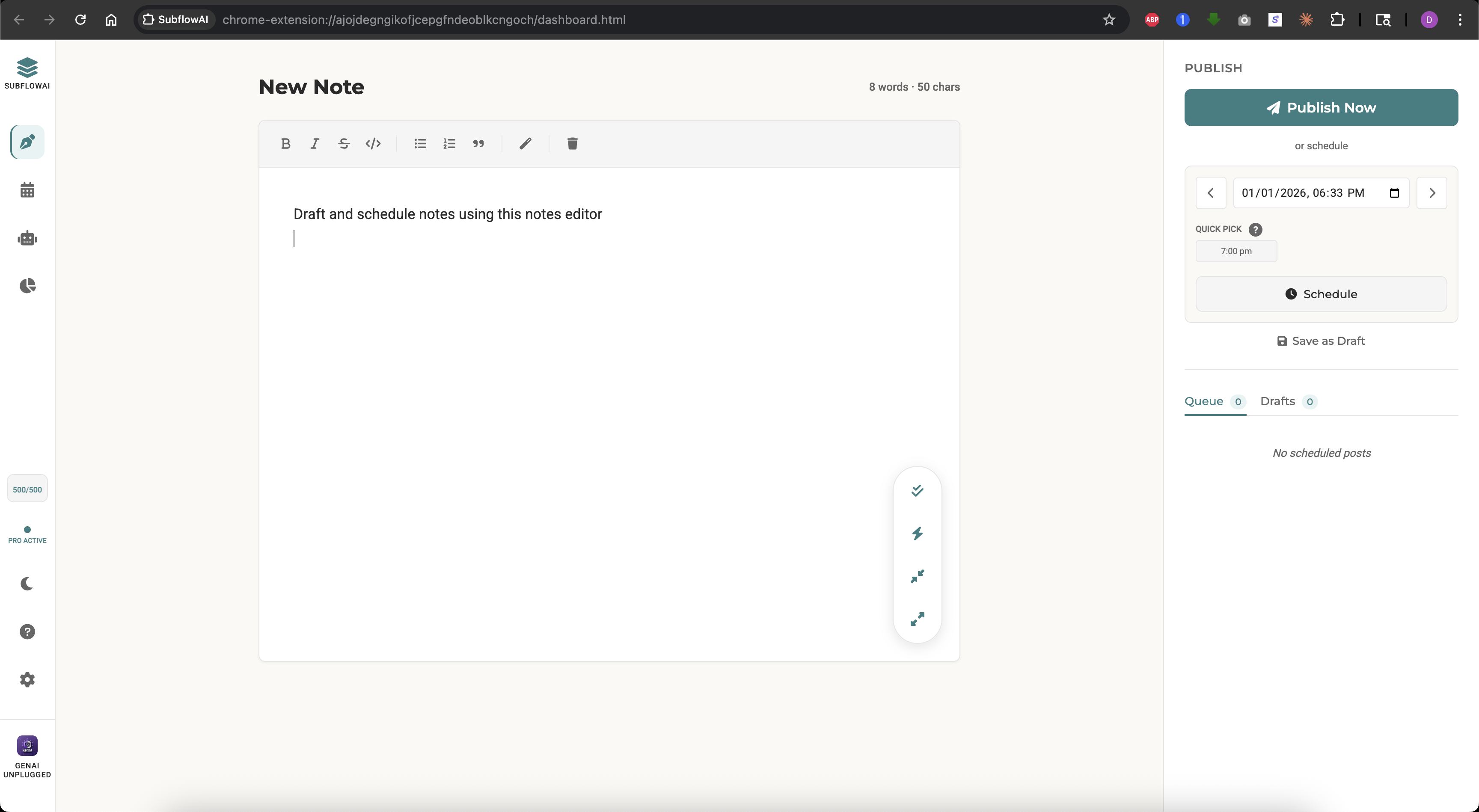
SubflowAI's editor supports full Substack-compatible rich text:
Formatting Options
| Format | Keyboard Shortcut | Use Case |
|---|---|---|
| Bold | Ctrl/Cmd + B | Emphasis, key points |
| Italic | Ctrl/Cmd + I | Titles, gentle emphasis |
| (toolbar) | Corrections, humor | |
| Bullet List | (toolbar) | Multiple points |
| Numbered List | (toolbar) | Steps, rankings |
| Quote | (toolbar) | Citations, callouts |
| Code | (toolbar) | Technical terms |
| Emojii | (toolbar) | Emotions |
| Image | (toolbar) | Visuals |
What You See Is What Posts
Unlike copy-pasting from Google Docs, SubflowAI's editor output matches Substack exactly. The extension converts your formatted text to Substack's internal format (ProseMirror JSON) before posting.
This means:
- Bold stays bold
- Lists stay lists
- Line breaks don't multiply or vanish
- No weird spacing issues
AI Refinement in the Editor
While editing, you can highlight text and apply AI refinements:
- Fix Grammar - Corrects errors without changing meaning
- Make Punchy - Tightens language, removes fluff
- Shorten - Compresses by ~30%
- Expand - Adds depth and nuance
The AI respects your formatting. Bold stays bold after refinement.
Character Count
Notes have a sweet spot: 280-375 characters. The editor shows a live character count so you know when you're in range.
Going over 500 characters? Consider splitting into two notes or trimming.
Smart Format Button
Got AI output in JSON array format? Or pasted multiple notes separated by blank lines?
Click "Smart Format" and SubflowAI splits them into individual note variations, each ready to schedule independently.
50+ Features Overview
SubflowAI is more than scheduling + AI. Here's the full feature breakdown:
Writing & Editing
- Rich text editor (bold, italic, strike, lists, quotes, code blocks)
- @Mentions — tag other Substack writers natively
- Link Previews — paste any URL for rich link preview cards
- Character count with optimal range indicator
- Smart Format for JSON/multi-note parsing
- Emoji picker with 6 categories
- Image support (inline uploads)
- AI refinement tools (grammar, punchy, shorten, expand)
Scheduling & Calendar
- Server-side scheduling (syncs with Substack's servers — publishes even when Chrome is closed)
- Visual monthly calendar grid
- 5 configurable time slots (default: 7am, 10am, 1pm, 4pm, 7pm)
- Quick-pick chips for next available slots
- Batch scheduling across multiple days with weekday selection
- Automatic server-side queue management
- Auto-sync every 15 minutes with Substack's servers
- Scheduling method badges (Server green / Chrome amber)
- Capacity indicators (5+ notes/day warning)
- Click-to-edit from calendar view
AI Studio
- URL-to-Notes: Paste any article link
- Text-to-Notes: Paste raw content
- 7 unique variations per generation
- Brand Voice configuration (identity, tone, frameworks, signature phrases)
- Bulk Import via JSON — import and schedule multiple Notes at once
- Custom system prompt (advanced users)
- Powered by Google Gemini models
- 500 AI generations/month (Pro)
- URL validation (blocks thin content)
Drafts & Queue Management
- Dedicated Drafts tab
- Scheduled Queue tab
- One-click edit from queue
- Delete with confirmation
- Bulk actions (select multiple)
- Status indicators (pending, posted, failed)
Analytics & History
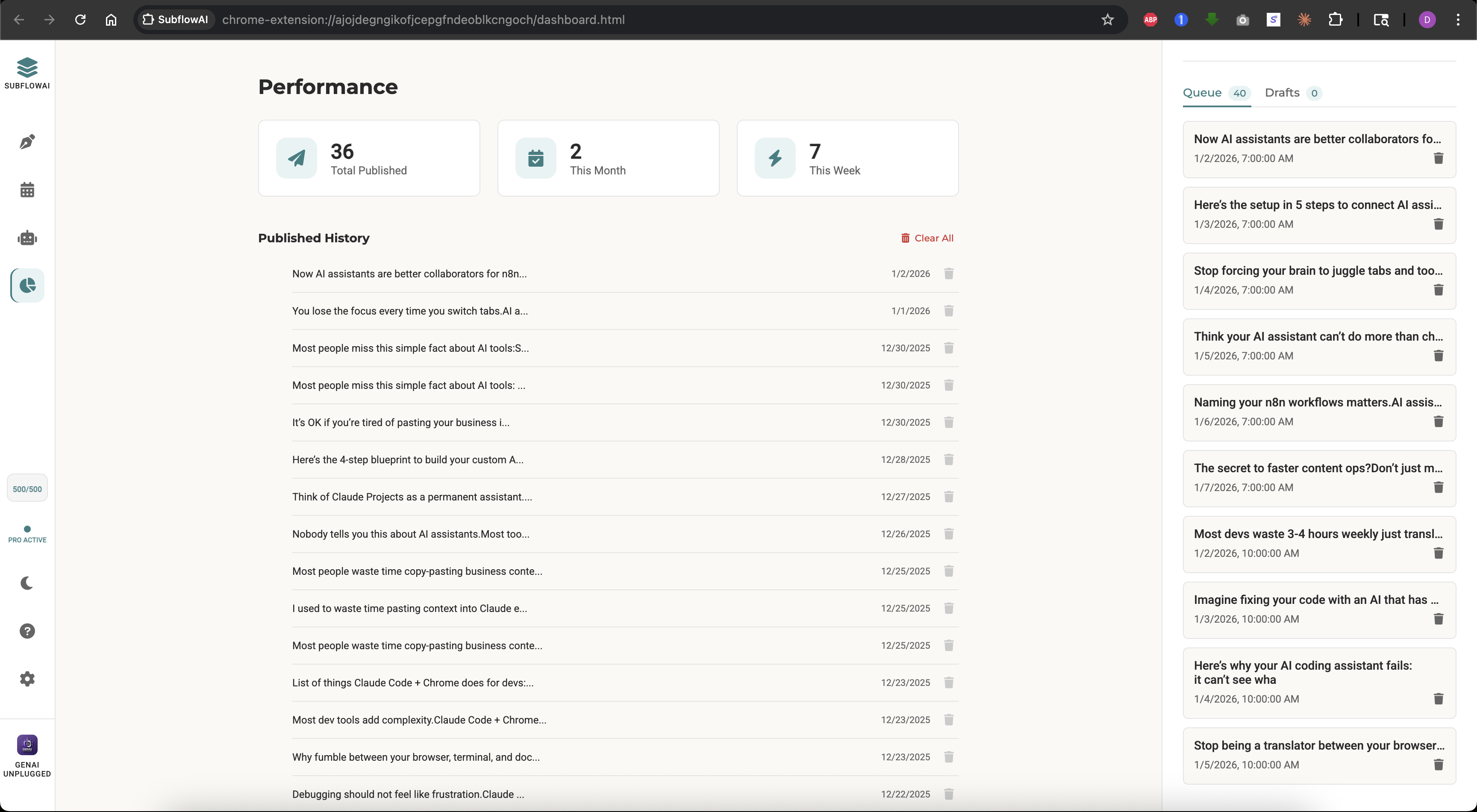
- Total notes posted (all time)
- Monthly and weekly notes count
- Top 10 performers ranking (reactions, restacks, replies)
- Posting patterns analysis (best time, best day, optimal length)
- AI content insights (Pro)
- Remix top notes with one click — generate variations from your best content
- Delivered notes history with tabbed layout (Overview, Top Notes, Patterns, Insights, History)
- Clear history option
Settings & Customization
- Light/dark theme toggle
- License key management
- Trial status display
- AI credits remaining
- Export/import data (backup)
- Help center with tutorials
Reliability Features
- Server-side scheduling (notes publish when browser is closed)
- Automatic Chrome-to-server upgrade when slots are available
- Duplicate post prevention
- Cloud sync backup (Chrome storage)
- Auto-restore on reinstall
- Auto-retry on failure (up to 3x at 15-minute intervals)
- Offline mode (view-only)
- Backup reminder (7-day warning)
- One-click manual export
Security & Privacy
- No passwords stored
- Uses your existing Substack session
- API keys stay local (for AI)
- License validation via secure endpoint
- XSS sanitization on all inputs
User Experience
- Keyboard shortcuts (Ctrl+B, Ctrl+I, etc.)
- Toast notifications for actions
- Modal confirmations for destructive actions
- Onboarding flow for new users
- "What's New" modal for updates
- Video tutorial links
Pricing & Value
SubflowAI offers a free trial and two paid options:
Free Trial: 5 Days, Full Access
- All features unlocked
- No credit card required
- 500 AI generations included
- Great for testing the workflow
Monthly Plan: $9.97/month
- Unlimited notes scheduling
- 500 AI generations/month
- Priority support (email)
- Cancel anytime
5-Year Access: $69.97 (One-Time)
- Everything in Monthly for 5 years
- Best value for committed writers
- Works out to $1.17/month
Substack Paid Members: 25% Off
- Monthly: $7.48/mo
- 5-Year: $52.48
Value Calculation
What's your time worth?
| Task | Manual Time | With SubflowAI |
|---|---|---|
| Write 5 notes | 45 min | 2 min (AI assist) |
| Schedule 5 notes | 10 min (reminders) | 1 min |
| Remember to post | Mental overhead all week | 0 min |
| Total | 55+ min + stress | 3 min, no stress |
Over a month, you save 4 hours and significant mental energy.
At $9.97/month, if your time is worth more than $2/hour, SubflowAI pays for itself.
ROI from Growth
If consistent posting adds just 5 extra subscribers per week (conservative), that's:
- 20 subscribers/month
- 240 subscribers/year
If you monetize at $5/month paid subscriptions and 5% convert:
- 12 paid subscribers/year
- $720/year additional revenue from a $69.97 tool
1,341% ROI.
The math is clear. Start scheduling smarter.
5-day free trial. No credit card. Cancel anytime.
Install SubflowAI Free →FAQ: 10 Common Questions Answered
1. Does Substack have native Notes scheduling?
Yes — as of March 2026, Substack lets you schedule one Note at a time. For batch scheduling (30+ Notes at once), AI repurposing, visual calendar, and analytics, writers use SubflowAI.
2. How does SubflowAI actually post to Substack?
SubflowAI seamlessly integrates with Substack's undocumented server-side APIs to sync your Notes directly with Substack's publishing queue. Notes publish even when Chrome is closed — Substack's servers handle the delivery. The extension keeps a Chrome alarm fallback for edge cases to ensure maximum reliability. No passwords are stored — it uses your existing Substack login session.
3. Do I need to keep Chrome open for scheduled posts to work?
No. Since v2.0, SubflowAI uses Substack's server-side scheduling. Notes publish on Substack's servers even when Chrome is closed or your laptop is off. You need Chrome open only when initially scheduling the Notes. A small number of Notes may use Chrome alarm fallback (shown with an amber badge) — for those, Chrome must be running at the scheduled time.
4. Is my Substack password stored?
No. SubflowAI never asks for or stores your Substack password. It uses your existing browser session. You must be logged into Substack in Chrome for the extension to work.
5. What happens if I close my laptop before a scheduled post?
Server-side scheduled Notes (the default) will publish on time regardless — SubflowAI schedules them directly on Substack's servers. Notes using Chrome alarm fallback will attempt to post when you reopen Chrome.
6. Can I edit a scheduled note after setting it?
Yes. Click the note in the Calendar view or Queue tab. Make your edits. Save. The updated version will post at the scheduled time.
7. How many notes can I schedule?
Unlimited. There's no cap on scheduled notes. You could schedule 100 notes across the next month if you wanted.
8. Does AI generation use my writing style?
Yes. SubflowAI has a Brand Voice feature where you configure your identity, tone, content frameworks, and signature phrases. Every AI-generated Note reflects your unique writing style — no more generic AI output.
9. What if the AI generates something I don't like?
Don't use it. The AI provides 7 variations per generation. Pick the ones that resonate, edit them, or regenerate with different source content. You're always in control of what gets scheduled.
10. Can I get a refund?
Yes. If you're not satisfied within 14 days of purchase, contact [email protected] for a full refund.
Getting Started: Your 5-Minute Setup
Ready to schedule your first Notes? Here's exactly how to start:
Step 1: Install the Extension (30 seconds)
- Go to this Chrome Web Store Link (or search "SubflowAI")
- Click "Add to Chrome"
- Pin the extension to your toolbar
Step 2: Start Your Free Trial (1 minute)
- Click the SubflowAI icon
- Click "Start Free Trial"
- You get 5 days of full access, no credit card needed
Step 3: Write Your First Note (2 minutes)
- Type or paste content into the editor
- Use formatting tools if needed
- Watch the character count (aim for 280-375)
Step 4: Schedule It (1 minute)
- Click the Schedule tab
- Pick a date
- Select a time slot (or use Quick Pick)
- Click "Schedule"
Step 5: Check the Calendar (30 seconds)
- Click the Calendar view
- See your scheduled note on the grid
- Smile knowing it's scheduled on Substack's servers — it'll post even if Chrome is closed
That's it. You've scheduled your first Substack Note.
Next Steps
- Set up Brand Voice: Configure your identity, tone, and signature phrases in Settings
- Try AI Studio: Paste an article URL and generate 7 variations in your voice
- Batch schedule: Fill your entire week in one session
- Use @Mentions: Tag other Substack writers in your Notes
Get Help
- Help Center: Click the
?icon in the extension - Email: [email protected]
- Response time: Within 24-48 hours
Upgrade When Ready
After your trial, choose Monthly ($9.97/mo) or 5-Year ($69.97) to continue scheduling.
Conclusion
Consistent Substack Notes posting doesn't have to mean constant effort.
With SubflowAI, you can:
- Write once, post all week through batch scheduling
- Generate content in your voice with AI repurposing + Brand Voice
- Tag and engage with @mentions and rich link preview cards
- See your strategy at a glance with the visual calendar
- Never miss a posting window — server-side scheduling means Notes publish even when your browser is closed
The writers who grow fastest aren't necessarily better writers—they're more consistent. SubflowAI makes consistency automatic. Want to build more AI automations like this? Explore our free courses on AI, automation, and content systems.