The AI Learning Roadmap for Non-Technical People
You want to learn AI. You just don't know where to start.
This page maps a practical, step-by-step path from "AI-curious" to "AI-productizer" using courses, real tools, and hands-on projects. No coding. No math. No prior tech experience required.
Free courses with alternate tracks. Zero code required. Pick your path.
Before You Start: The Mindset Check
Before stages and tools, let's address what actually holds most people back.
You're Not Behind
AI rewards domain expertise more than age or technical background. Your experience in your field is an advantage, not a handicap.
Stop Researching. Start Doing.
Analysis paralysis is the #1 killer of AI learning. Pick one thing from this roadmap and do it today.
The Tutorial Hell Warning
Passive consumption without building equals zero progress. Every stage has an exercise. Do it.
AI Amplifies What You Already Know
AI is a power tool for skills you already have. Find your real-world problem and start solving it.
The Skills That Never Change
AI tools will keep changing. These skills remain valuable no matter which tools win:
Workflow-First Thinking
Map your processes on paper before touching any tool. Ask: What do I do repeatedly? Which parts require my judgment? Which parts don't?
Problem-Solving Over Tool Knowledge
Knowing how to break a problem into AI-solvable pieces matters more than knowing every feature of any single tool.
Daily Practice Over Course Binges
15 minutes of AI on real work beats a weekend course marathon. Do exercises on YOUR problems, not textbook examples.
Do I Need to Learn Python or Code?
No. For 90% of non-technical professionals, you don't need Python to get enormous value from AI.
No-code tools have eliminated the Python prerequisite for builders. Claude Code writes any code you need when you describe what you want in plain English. Lovable and Replit let you build full web apps without seeing a line of code. n8n lets you automate anything visually. This entire roadmap requires zero coding.
Other roadmaps include Python because they're built for a different audience - people who want to train AI models or do machine learning research. That's valuable work. It's just not what most non-technical people need.
The real question isn't "Should I learn Python?" It's "What am I trying to do?"
- Want to build AI tools and automations? You don't need Python. This roadmap covers that.
- Want to train custom AI models? You'll need Python eventually. That's a different path.
- Want to do data science or ML research? You'll need Python and math. That's a different path.
We're not hiding Python from you. We're telling you when you actually need it. And if you do want it later, here's where to go:
freeCodeCamp Python for Beginners - Free, self-paced. For those who want Python later.
Andrew Ng's Machine Learning Specialization - Coursera. For those who want to go deeper into ML.
Coming in this series: "Why This AI Roadmap Skips Python (And When You'll Need It)"
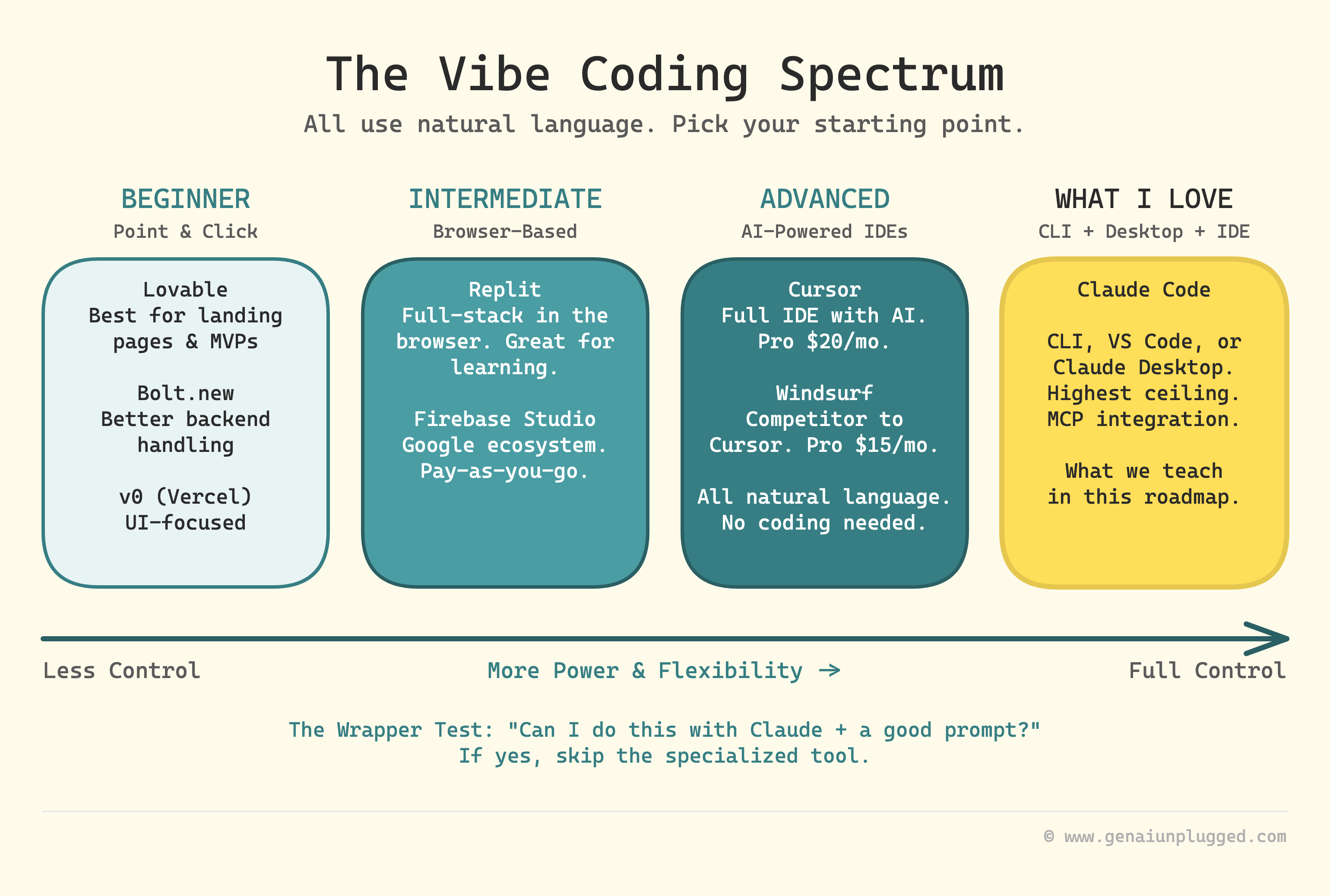
What is Vibe Coding?
Describe what you want in plain English, AI builds it. Coined by Andrej Karpathy.
The Tool Spectrum
Beginner (Point and click): Lovable, Bolt, v0
Intermediate (Browser-based): Replit, Firebase Studio
Advanced (AI-powered IDEs): Cursor, Windsurf
What I Love (CLI + Desktop + IDE): Claude Code
The Wrapper Test
Before paying for a specialized AI tool, ask: Can I do this with Claude plus a good prompt? If yes, save your money.
Coming in this series: "The AI Tool Landscape: What's Worth Paying For"
Find Your Starting Point
Not everyone starts at the beginning. Find yourself below:
| If you are... | Start at | Quick Win |
|---|---|---|
| Completely new to AI, feeling overwhelmed | Stage 0 | Understand what AI actually is (15 min) |
| Used ChatGPT but want better results | Stage 1 | Build a personal prompt library (1 hour) |
| IT professional wanting career shift | Stage 1, fast-track to Stage 3 | Connect AI to your existing tools |
| Freelancer wanting to scale income | Stage 2 | AI assistant saving 5 hrs/week |
| Business owner automating processes | Stage 2 | Your first n8n automation |
| Want to build apps and systems without coding | Stage 2 | Describe what you want, Claude Code builds it |
| Already comfortable, want AI agents | Stage 4 | Build a research agent in 27 min |
| Want to build AI products/services | Stage 5 | From demo to production |
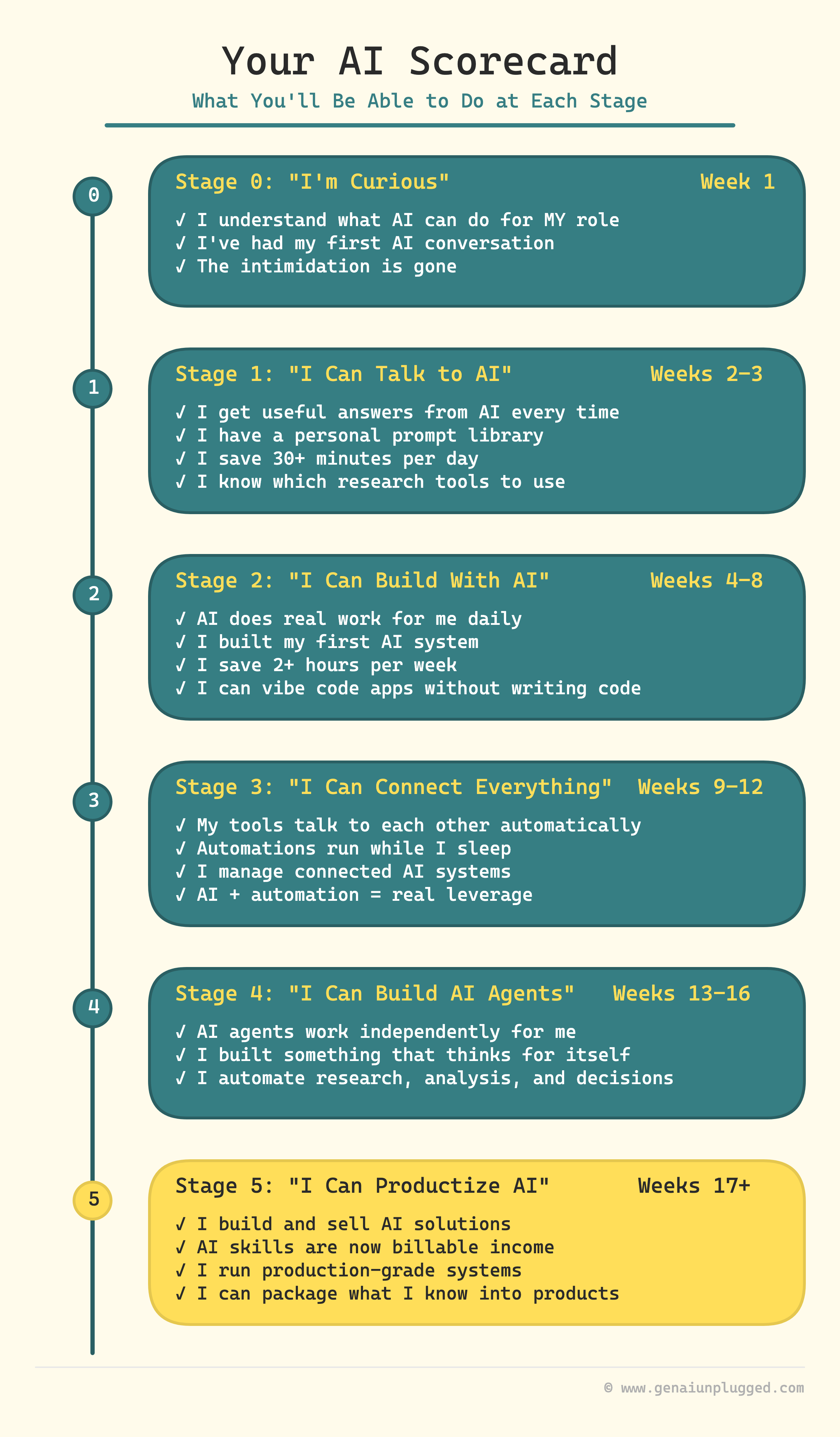
Stage 0: "I'm Curious" - Understanding AI Without Jargon (Week 1)
Transformation: "I went from anxious about AI to understanding how it actually works."
What to Study
| # | Lesson | What You'll Learn |
|---|---|---|
| 1 | LLMs and Prompts in Generative AI | What LLMs are and how they work - 15-minute read, plain English |
Must-Have External Resource
| Resource | Details |
|---|---|
| Andrew Ng's AI for Everyone | Coursera course (7 hours). Most recommended 'start here' resource globally. Free to audit. |
Optional: Strengthen Your Foundation
| Resource | Details |
|---|---|
| Elements of AI | University of Helsinki. Gentlest on-ramp, zero coding. |
| Google AI Essentials | Hands-on with Gemini, includes certificate. |
| Futurepedia: How to Learn AI in 29 Minutes | Best single video overview for visual learners. |
| Jeff Su: Give Me 9 Minutes, I'll Make You AI-Native | Excellent emotional framework for the AI learning journey. |
Try This Now
Open Claude (claude.ai, free), paste this prompt: 'I'm a [your job title] who has never used AI before. Explain what AI can realistically do for someone in my role. Be specific - give me 3 examples of tasks I do manually that AI could handle. No hype, just honest assessment.'
Coming Soon
- AI Anxiety Antidote: Your First 15 Minutes with AI - True beginner explainer for people who have never used ChatGPT. Zero jargon, 15-min read.
Milestone reached! You understand what AI is, what it can do, and what it can't do.
Stage 1: "I Can Talk to AI" - Prompt Engineering Foundations (Weeks 2-3)
Transformation: "I went from typing random questions to getting useful answers every time."
Prompt Engineering for AI Automation →
9 lessons. The complete path from basic prompts to production AI workflows.
What to Study
Lesson 1 (LLMs and Prompts) is covered in Stage 0. Start here at Lesson 2.
| # | Lesson | What You'll Learn |
|---|---|---|
| 1 | How to Control Large Language Model Output | Stop getting essays when you wanted a bullet list. Control format, length, and tone. |
| 2 | Zero-Shot, One-Shot, and Few-Shot Prompting | The three basic ways to structure a prompt and when to use each. |
| 3 | Structured Outputs and JSON Prompts Guide | Get AI to output data you can use in other tools, not just paragraphs. |
| 4 | Chain-of-Thought Reasoning Prompts | Make AI reason step-by-step. The single biggest quality improvement. |
| 5 | Task Decomposition: Break Big AI Tasks | Large tasks fail. Broken-down tasks succeed. The Plan-Draft-Critique workflow. |
| 3 more lessons → | Continue in the full course |
Research Tools
| Tool | Description |
|---|---|
| Perplexity | AI-powered search that cites its sources. Like having a research assistant that shows its work. (free) |
| NotebookLM | Upload your documents, ask questions about them. Google's tool for making sense of large document sets. (free) |
Reference Guides
| Guide | Details |
|---|---|
| Anthropic's Prompt Engineering Guide | Official best practices from the makers of Claude |
| OpenAI's Prompt Engineering Guide | The other major reference |
Milestone reached! Your Personal Prompt Library - 5-10 tested prompts for your specific work.
Stage 2: "I Can Build With AI" - First AI Systems (Weeks 4-8)
Transformation: "I went from chatting with AI to having it do real work for me."
Track A: Claude Cowork + Projects
Best for: Writers, consultants, coaches, content creators, service providers
Claude Cowork + Projects Course →
14 lessons. The complete path from first project to advanced AI workspaces.
| # | Lesson | What You'll Learn |
|---|---|---|
| 1 | Claude Projects 101: Your First Custom AI Assistant | Setting up your first Claude Project |
| 2 | How to Give Claude Your Brand Voice | Training AI to sound like you |
| 3 | The AI Writing System That 3x'd My Content Output | Full AI writing workflow |
| 4 | My AI Research Assistant That Saves 5 Hours Per Client | AI-powered research workflow |
| 5 | The AI Proposal Generator That Closes 40% More Deals | Coming Soon |
| 9 more lessons → | Continue in the full course |
Track B: n8n Visual Builder
Best for: Visual thinkers, automation lovers, process-heavy businesses
42 free lessons on YouTube. The complete path from zero to advanced automations.
| # | Lesson | What You'll Learn |
|---|---|---|
| 1 | Automate Email Attachments to Google Drive with n8n | Quick automation win |
| 2 | n8n Competitor Analysis Automation | AI-powered competitive intelligence |
Track C: Claude Code (The AI Builder)
Best for: Anyone who wants to build anything - apps, automations, systems
7 lessons. The complete path from first build to production systems.
| # | Lesson | What You'll Learn |
|---|---|---|
| 1 | 1 Article, 6 Platforms: Content Multiplication Engine | See Claude Code build a real system from scratch |
| 2 | The Claude Code Extension Stack | Skills, hooks, and commands for Claude Code |
| 3 | MCP + Hooks: The Integration Layer | Coming Soon |
| 4 | I Built a 3-Agent Research Team in Claude Code | Coming Soon |
| 5 | Claude Code Runs My Content Business While I Create | Coming Soon |
| 6 | Advanced Claude Code: Plugins, SDK, and Building Tools | Coming Soon |
Coming Soon
- Which AI Path is Right For Me? - Quiz-style decision framework: Claude Cowork vs n8n vs Claude Code vs combination, based on your role and goals.
Milestone reached! Your First Working AI System saving 2+ hours per week.
Creative AI Tools: The Visual and Audio Side
Not part of the 5-stage roadmap, but essential for creators.
Image Generation
MidJourney - Quality leader for AI images. $10/mo basic plan. Best for: Marketing visuals, social media, concept art.
DALL-E - OpenAI's generator, built into ChatGPT. Best for: Quick images without leaving your chat.
Ideogram - Specializes in readable text in images. Best for: Logos, posters, banners with text.
Google Imagen - Available through Gemini. Improving rapidly. Best for: Photorealistic images.
Video Generation
Google Veo - Google's video model. Short clips from text. Best for: Quick video clips.
Runway - Most established AI video tool. $12/mo starter. Best for: Short-form content, social media clips.
Kling - Realistic motion and longer clips. Best for: Natural-looking video.
Hailuo - Good quality, generous free tier. Best for: Free video generation.
Audio and Music
ElevenLabs - Voice cloning and human-quality text-to-speech. Best for: Voiceovers, narration.
Suno - Full song generation from text descriptions. Best for: Background music, jingles.
NotebookLM - Generates podcast-style audio from documents. Best for: Audio summaries of content.
Design
Canva AI - AI features throughout Canva: text-to-image, magic resize. Best for: General design with AI assist.
Figma AI - AI-powered design for UI/UX. Best for: App mockups, UI design.
Coming in this series: "The AI Tool Landscape: What's Worth Paying For"
Stage 3: "I Can Connect AI to Everything" - Integration and Automation (Weeks 9-12)
Transformation: "I went from one AI tool to a connected system that works while I sleep."
The complete path from understanding MCP to building integrations.
What to Study
| # | Lesson | What You'll Learn |
|---|---|---|
| 1 | What is MCP? | Lesson 1 - Plain English intro with real examples |
| 2 | Why MCP Was Created | Lesson 2 - The big picture of AI connectivity |
| 3 | How MCP Actually Works: Hosts, Clients, and Servers | Lesson 3 - The restaurant analogy that makes MCP architecture click |
| 4 | The Three Superpowers of MCP: Tools, Resources, and Prompts | Lesson 4 - Know when to use each MCP capability |
| 5 | Build an MCP Server in 30 Minutes | Lesson 5 - First hands-on MCP build |
| 6 | Connect AI Assistants to n8n Workflows via MCP | Bridge between Claude and n8n |
| 7 | MCP + Hooks: The Integration Layer | How MCP connects Claude Code to external tools and services |
Coming Soon
- Integration Patterns for Non-Technical People - When to use MCP vs n8n vs Claude Code for different integration scenarios.
Milestone reached! Complete MCP Lesson 1 and connect Claude to one tool you already use (Google Drive, Notion, or your email).
Stage 4: "I Can Build AI Agents" - Autonomous Systems (Weeks 13-16)
Transformation: "I went from manually running AI to having AI agents that work independently."
6 articles. Build and deploy AI agents for real tasks.
What to Study
| # | Lesson | What You'll Learn |
|---|---|---|
| 1 | Building 5 Research Agents for My Content System | Multi-agent system design and architecture |
| 2 | Build an AI Research Agent in 27 Minutes (No Code) | Your first AI agent - zero code |
| 3 | AI Agent That Analyzes SERPs (SEO/AEO Agent Build) | Specialized research agent |
| 4 | The Agent That Replaced My $200/Month Competitor Analysis Tool | Competitive intelligence agent |
| 5 | Never Publish Outdated Technical Content Again (Verification Agent) | Technical verification agent |
| 6 | Gap Analyzer Agent Found 47 Content Opportunities | Content strategy agent |
Milestone reached! Your First AI Agent working independently.
Stage 5: "I Can Productize AI" - From User to Builder (Weeks 17+)
Transformation: "I went from using AI tools to building and selling my own AI solutions."
What to Study
| # | Lesson | What You'll Learn |
|---|---|---|
| 1 | What Nobody Tells You About AI Automation Costs - Start Tracking Them Now! | The hidden costs of AI automation and how to track them |
| 2 | Build Your Content OS: AI-Powered Pipeline | Coming Soon |
| 3 | The 3-Day MVP: SubflowAI in 19 Days | Build-in-public product launch case study |
| 4 | macOS Backup App in 2 Hours with Claude Code | Rapid prototyping with AI |
| 5 | What OpenClaw Actually Is (And Isn't) | Lesson 1 - Non-developer's honest assessment. Start here. |
| 6 | OpenClaw Deep Dive: Security, Cost, Architecture, and Setup | Lesson 0 (standalone live session) - Architecture, security, cost control with Wyndo |
| 7 | 60-Minute Secure OpenClaw Setup on Hetzner | Coming Soon |
| 8 | 3 OpenClaw Workflows That Save 5 Hours/Week | Coming Soon |
| 9 | OpenClaw Security + Cost Mastery: The $30/Month Setup | Coming Soon |
The Commercial Side
The From Demo to Dependable series covers the commercial side: client discovery, scoping, cost negotiation, break-even framework, delivery, handoff, and long-term support.
Coming Soon
- How to Package and Sell Your AI Workflow - Business side of productizing - pricing, packaging, delivery, support.
Milestone reached! Your Productized AI Service or Tool.
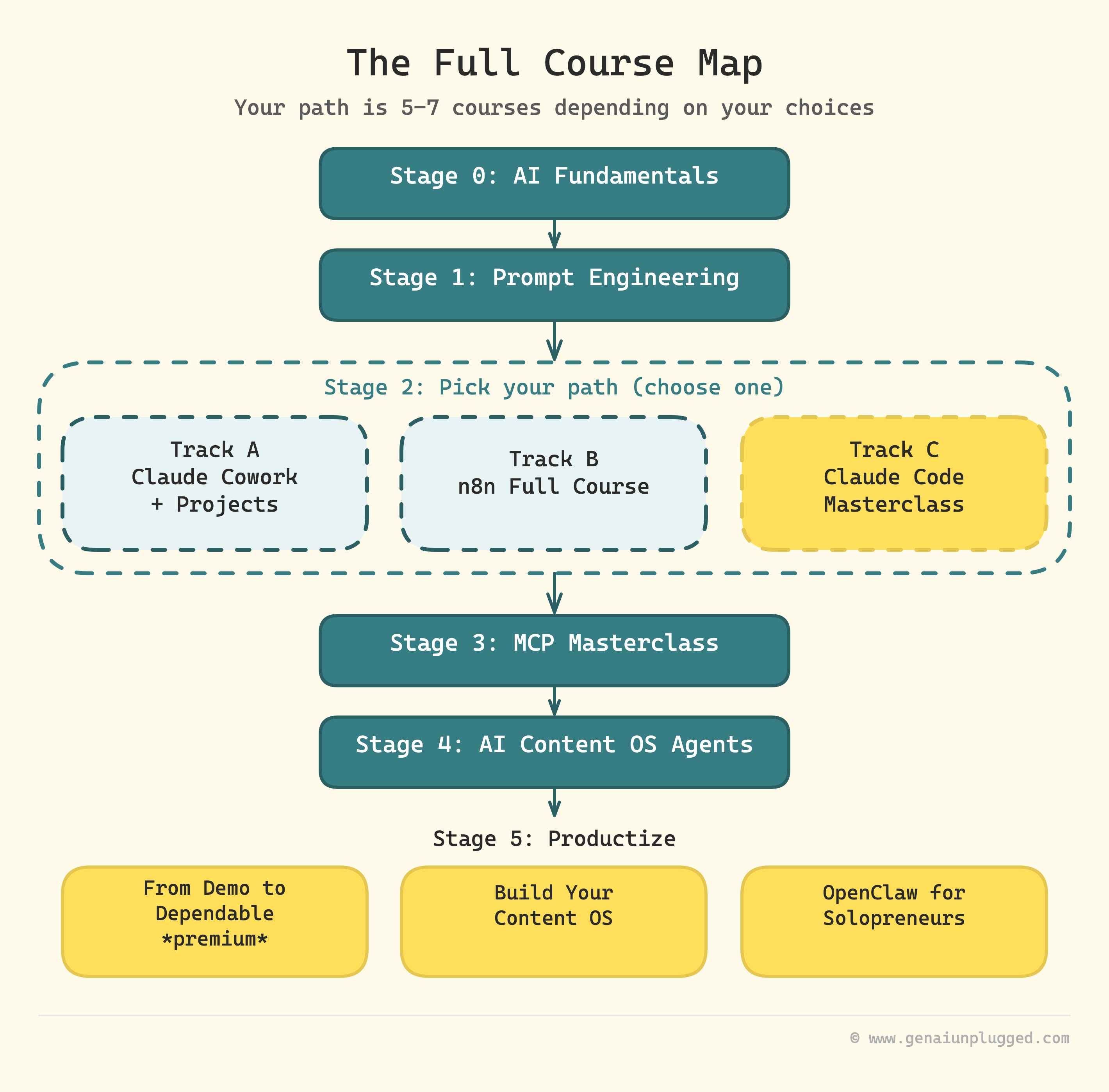
The Full Course Map
Here's every course referenced in this roadmap, organized by stage. Stage 2 has three alternate tracks - pick the one that fits your goals (you don't need all three):
| Stage | Course | Platform |
|---|---|---|
| 0 | AI Fundamentals for Everyone | Substack |
| 1 | Prompt Engineering | Substack |
| 2 | Pick your path (choose one): | |
| ↳ A | Claude Cowork + Projects | Substack |
| ↳ B | n8n Full Course | YouTube |
| ↳ C | Claude Code Masterclass | Substack |
| 3 | MCP Masterclass | Substack |
| 4 | AI Content OS Agents | Substack |
| 5 | From Demo to Dependable | Substack |
| 5 | Build Your Content OS | Substack |
| 5 | OpenClaw for Solopreneurs | Substack |
Ten courses backing every step (nine free, one premium). Your path is 5-7 courses depending on your choices.
Your Practice Framework
Your daily AI practice routine in four steps:
| Step | What to Do |
|---|---|
| 1 | Pick the task you hate most - that's your first AI target |
| 2 | Open Claude before starting any task - make it a habit |
| 3 | Track what worked - keep AI Breadcrumbs linking prompts to results |
| 4 | Do exercises on YOUR problems - not textbook examples |
The 15-Minute Rule
Spend 15 minutes each day using AI on one real task. Within a month, AI becomes second nature.
Frequently Asked Questions
Do I need to learn Python to use AI?
No. This roadmap covers five stages of practical AI skills without any coding. Tools like Claude Code, Lovable, and n8n let you build AI systems by describing what you want in plain English. Python is only needed for training custom AI models or ML research.
Am I too late to start learning AI?
No. AI rewards domain expertise more than age or technical background. Your experience in your field is an advantage. A nurse who learns AI becomes more valuable than a fresh graduate who only knows AI but not nursing.
What is vibe coding?
Vibe coding means describing what you want an app or tool to do in plain English, and AI builds it. Coined by Andrej Karpathy. Tools like Claude Code, Lovable, Replit, and Cursor all enable vibe coding at different skill levels.
How long does the full AI learning roadmap take?
The five stages span roughly 17+ weeks at a comfortable pace. You can skip to any stage based on your current skill level. Most people see real value from Stage 1 within the first week.
Can I learn AI without coding?
Yes. All nine courses can be completed without writing a single line of code. Even Claude Code (Stage 2 Track C) works by describing what you want in plain English.
What if I'm not a technical person?
This roadmap was built specifically for non-technical people: freelancers, consultants, business owners, content creators, and professionals wanting to use AI practically.
What tools do I need to start?
A web browser and a free Claude account (claude.ai). That's it for Stages 0-1. As you progress you'll add tools, but nothing is needed upfront beyond a browser.
How much does it cost?
Stages 0-1 are completely free. From Stage 2 onward, budget $20-50/month for AI tools. Most tools have free tiers sufficient for learning. Don't pay for anything until Stage 2.
What about ChatGPT vs Claude?
Both are excellent. This roadmap uses Claude because its Projects feature (Stage 2) and MCP integration (Stage 3) create a natural progression. Prompting skills transfer to any AI tool.
What's the difference between AI literacy and AI fluency?
AI literacy is understanding what AI is and using basic tools. AI fluency is building AI systems that do real work - automation, agents, connected workflows. Most courses teach literacy. This roadmap teaches fluency.
How do I avoid tutorial hell?
Build something at every stage. Don't move to the next course until you've completed the exercise on YOUR real problems. 15 minutes of practice on real work beats hours of passive video watching.
What are the best free AI courses?
For AI understanding: Andrew Ng's AI for Everyone (Coursera, free). For this roadmap: all nine courses are free. For Python later: freeCodeCamp's Python for Beginners.
Will AI take my job?
AI changes jobs more than it eliminates them. By learning AI, you become the person who brings it to your team, not the person who gets replaced. Every stage here makes you more valuable - the nurse who uses AI for patient research, the consultant who delivers in hours not days. That's job security.
Is this roadmap for developers?
No. It's designed for non-technical professionals. Developers can benefit (especially Stages 2C-5) but will likely skip Stages 0-1.
Start Now
Pick your starting point above. Hit the milestone. Move to the next stage.
The path exists. All you have to do is start walking.
Subscribe to GenAI Unplugged (free) to get notified when new content fills the "Coming Soon" gaps.
This is a living document and Part 1 of the AI Learning Roadmap series. Seven more articles are coming to dive deeper into the topics introduced here.